Monday, 22 January 2018

Mining, few tweaks


The next step is to implement a mining system allowing players to mine rocks. This feature, unlike the previous, is going to be quite challenging. I have been looking around on the internet for help sources and have found very little, therefore a lot of the implementation will come from experimentation.

I am going to treat the ore blocks like enemies to the Player, this will make the implementation easier and I will use ‘health’ as a way of determining the rock’s state. I will incorporate this with the work that I have just done for Unit 603 – Using AI in Computer Games, to which I created a working state machine system. These states can help me to determine the physical state of each rock as it gets damaged, and I’m hoping to be able to use these states to change the sprite.

EDIT - 27/01/2018: Update!
I have implemented the mining part of the system. There is currently no interaction, but there is collision being detected. The solution I found was to fire out a Ray-cast in the direction that the player is facing (determined by movement input). The hit data of the Ray-cast is stored in a variable, which I am currently using to log the name of the object hit to the console. One problem that I have come across is that I’m not sure how to deal with the animations. I believe that I would need to create a totally new set of animations for if the player is walking and mining at the same time. To combat this, as it looks strange, I have made it so that the Player can only mine when not moving (mining interrupts movement).
I also added a nice sky background to the level that I made in GIMP. It was created using a simple gradient of blue to white. Furthermore, the camera now finds the Player in the scene at game start and follows him around. There’s a bit of smoothing time, the camera ‘lags’ behind the Player, I’ve done this because I find that it’s easier on the eyes if the player isn’t always in the centre of the screen. For the duration of the next week, I will be working on implementing the second part to the mining: applying damage to the rocks.

Monday, 8 January 2018

First level, Player Character and Animations


Figure 1
 The first step for this week’s goal was to think of a way to implement my level. At first, I thought that my only option would be to drag and drop each individual sprite into the level. Not only would this have been very time consuming, but it would have also meant that editing the level would have been a lot of effort. This is when I stumbled upon a great tutorial by YouTube user quill18creates. This method involves creating a single sprite, with individual pixels representing the colour of the object which will be placed in world space. An array is made storing all 32-bit colour values (RGB 0 – 255) and it searches the sprite for those colours. These colours each correspond to their own prefab, which will be instantiated, depending where the colour was on the sprite. The sprite that I have created is shown below (fig. 1):
Figure 2
I created the sprite with colours that correspond to their respective ore colours, that way it’s easier to see which ores will spawn at which locations.

Figure 3
To make this work, I had to import all my sprites, creates prefabs out of them (a prefabricated object which acts like a mould / template) and then drag them into the array elements in the Unity inspector. For each of the ores I added a box collider so that it can detect collisions. This allows the player to stand on them and will be used when the mining mechanic is implemented.

Once the level was in place it was time to implement the Player Character and animations. This will enable me to be able to walk around my newly implemented level and open doors to some of the more juicer programming. Implementing the character was easy using the animation and animator windows within Unity.


The animator tool uses ‘States’ and ‘Parameters’ to work. States are the current form or standing that the object is in, while the parameters are conditions which help to transition between those states. I found that these states work better if there is a ‘base’ state – by which I mean a state which is default, has no animations attached to it, and can transition to any state depending on whether the parameters have been met, for this I called it ‘Player_Idle’. After creating the ‘Player_Walk’ animation (fig. 3), I simply then dragged this animation into the animator window and added the parameter of ‘isIdle’, which will transition to the walk state if it’s false. The final step was to add the code for the movement and voila! Our player can now move around the level!

Friday, 22 December 2017

Laying the Foundations


My goals for the first week were to lay down the foundations for the project. This was anything from setting up any folders that I might need, to creating my first scene. This scene is going to be used as a ‘landing screen’ -meaning that it’ll be the first screen that the player sees when the game starts. From here, they will be able to start or quit the game, and possibly even change options such as sound and screen resolution.


I’ve set up a basic start menu with button functionality. Clicking any of these buttons highlights then and runs its appropriate function (see appendix).


Thursday, 7 December 2017

Starting the Development - Introduction


The posts from this point forward will be about the development of the game. Over the past few weeks I’ve researched the game that I would like to create, and now I must put that into practice. For the entirety of this project, I will be learning new and exciting things about the world of programming. I have chosen to develop my project in Unity, using C#.

Each post that I create will contain the features that I have implemented from a summary point of view. I would like you to bear in mind that the development process won’t be as straightforward as portrayed in my posts, but I will do my best to document the struggles I have encountered along the way. I expect this project, Mini Miner, will be a great challenge given the time frame.

During the course of this year I will be researching mainly from two sources: a course that I have purchased on Udemy, and also the YouTube user GamesPlusJames. The Udemy course will be a great step towards learning the basics of the programming language, and once I have this knowledge I will be doing research on GamesPlusJames’ YouTube playlist titled “Learn to make an RPG game & learn C#”. The next week or so I will be starting my research before the actual development begins.

References to all help sources will be posted at the end of the blog, upon completion of the project.


Thursday, 23 November 2017

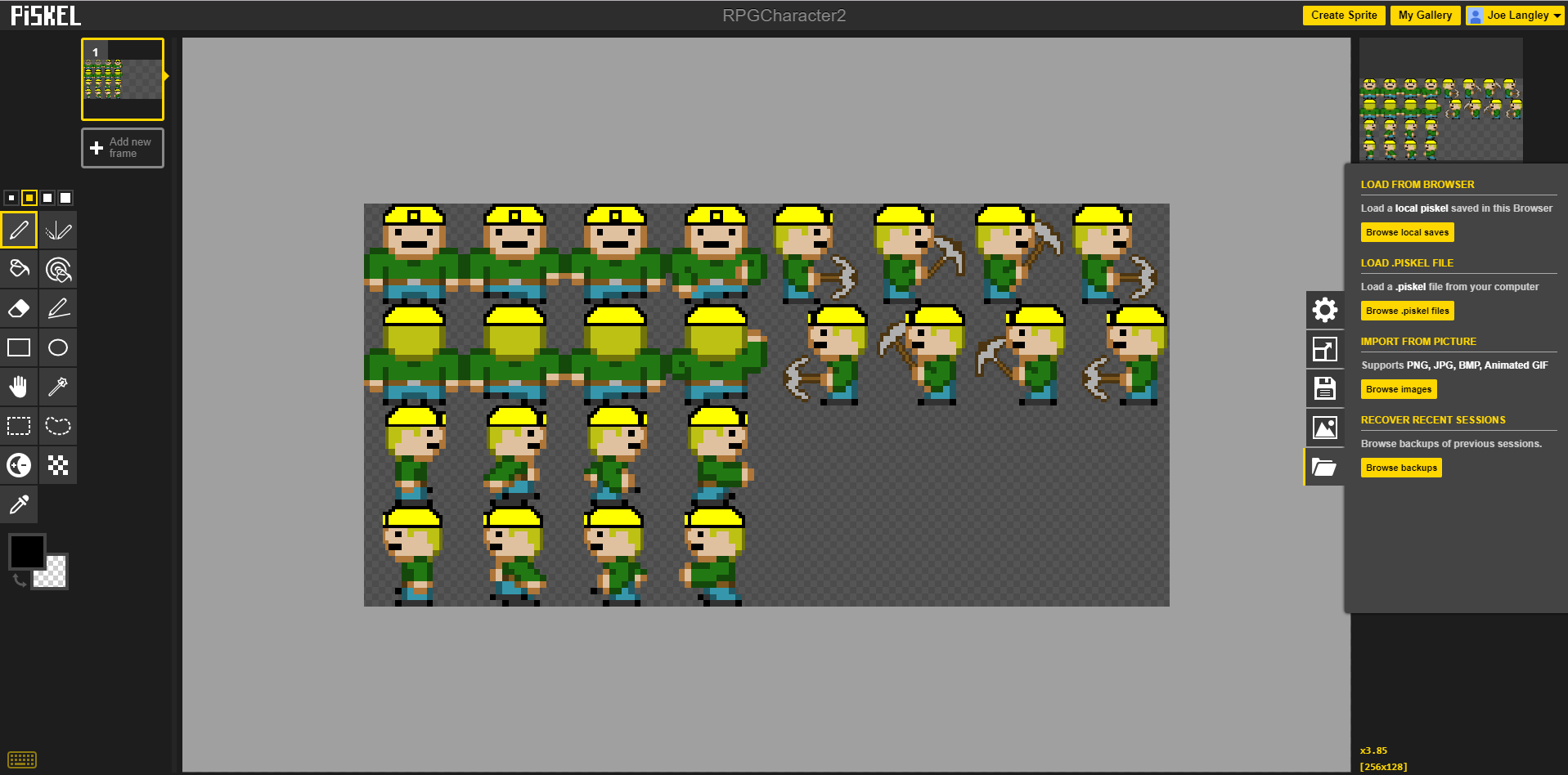
Creating the Player Sprite Sheet

Last week I created the ores, this week I have developed the Sprite Sheet for the Player. This also entailed researching how I was going to implement the Player sprites. The best way that I can see (might change upon development) is to use the Animator tool within Unity. This allows me to simply add each sprite to the animator using 'key frames'. I imagine that when I get around to implementing this it should be a lot easier seeing as I will have used 'Key frames' for Unit 601: 3D Modelling and Animation. I imagine that it won't be much different in Unity.


The basic iteration for creating a Sprite Sheet (fig. 1) is to have a motion for each direction. The nice thing about Piskel is that I can preview how my animation is going to look using the animator tool. The way this work is by adding each image onto a 'frame' on the left-hand side, this will then play through at whatever speed I choose on the right-hand side.


The left half of this Sprite Sheet are the movement animations. The right-side of this sheet is for when the player is mining. Being able to preview the animation for the mining within Piskel saved me a lot of time and convenience and allowed me to fine-tweak it.

Thursday, 9 November 2017

Creating the Ores

To start the development process for my game I first need some graphics. All graphics will be created in Piskel, which is a great tool for developing pixel art. I plan to use “tilemaps” in Unity, which automatically handles each tile, and also allows me to draw out my level using a “palette” of different tiles. This will be documented when I create my level, further on in the documentation.

To visualise it, I drew up a table with the rarity at which each ore would appear, as well as the name and value. These may be changed later on down the line due to balancing, but I think this is a good starting point.

Material
Rarity
Value
Dirt
Common
£1
Stone
Common
£5
Tin
Common
£20
Copper
Common
£25
Iron
Uncommon
£40
Emerald
Rare
£300
Ruby
Rare
£500
Diamond
Very Rare
£1,000

The character will start on the surface, and the easiest order to develop my assets will be in the order that the player will come into contact them. I will be focusing on all underground assets first, then I will attempt to develop the ones on the surface such as buildings, trees and minecarts etc.

All of my ideas and their development can be viewed in this document (opens in a new window).

Monday, 30 October 2017

Research into other games


Before I start the development on my project, I thought it would be a good idea to look into other games. Part of the inspiration for Mini Miner came from the game “Motherload”, a game that I used to play a lot in my teenage years. It was an epic game for it’s time, and all the kids at school had played it at least once. So as research for my project I decided to play it to look at some of the core elements of gameplay. While performing my playtest, I asked myself questions such as “What made this game so fun?” and “What mechanics are vital to this game’s success?”.

As the Player in this game, you are in charge of controlling a small mining ship. The game is fast-paced from the get-go, with the Player starting with the most minimal fuel. Fuel drains at a steady rate over time, but it’s not the only thing to be careful of. Flying down a hole and hitting the ground too hard incurs damage to the hull and hitting it too hard even blows the ship up in an instant. The main idea of the game is to mine ores, sell them at the shop to upgrade your ship, allowing you to mine further and further down. Some rocks block the way and require explosives to move. As you get further into the game, ores become harder to mine unless you upgrade the drill. The Player is notified at certain levels of depth that they are getting closer and closer to the Motherload via a transmission, and once you reach it (spoiler alert) there is an epic boss fight.

So, to quickly summarise: The Player must upgrade their ship as they go, be wary of fall damage, fuel usage and cargo capacity, all while heading towards one goal: hitting the motherload. I believe the what keeps the fun in this game is the requirement to manage many mechanics at once. The further you go, the harder it gets and so the higher the risk. But in this game risk really does equal reward.

Download the game and Project Files!

The project files along with any additional documentation are located in this folder on my Google Drive. To download the game please down...